Functions and Structured Programming in MATLAB
Just as in mathematics, it is convenient to be able to define logical
parts of a program as a single entity. This can be because it becomes
easier to understand a large program when it is composed of small
easily identified segments or because a small piece of code is going
to be used in several places in a program.
We have already met a small number of the built-in functions found in
MATLAB. However, much of the power of MATLAB is that you can extend
the language by writing your own functions. (MATLAB functions are
similar to sub-routines found in other programming languages such as
FORTRAN)
Mathematical functions
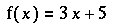
In mathematics, one can define a function, as for example:

This function can then be used by specifying the name of the function and an
argument. The argument is used to replace the variable x in
the definition of the function by the value that results in evaluating the
argument. So, for example, the following arguments give the results shown:
  Argument    Value

       0         5
       1         8
      -1         2
     2+3        20
and so on. Functions can have more than one argument, as in:

In this case, using the function requires specifying two arguments where the
first one is used in lieu of x and the second for y. So,
for example, the following table shows the result for a variety of argument
values:
  Function   Value

   g(0,0)      10
   g(1,0)      11
   g(0,1)       9
   g(2,1)      13
Note, in particular, the difference in result for g(1,0) and
g(0,1).
Functions in MATLAB
In MATLAB, one can define functions much as we define them in
mathematics. Like script files these are also stored with the
extension .m but the first line of the file must contain the
word function. For example, the following code segment
defines a MATLAB function which corresponds to the mathematical
definition:
  function y = equ(x)
  % Any comments immediately following the function declaration
  % are used for the HELP file

    y = 3.0*x + 5.0;
In this case, the function equ takes a local
variable x and returns a real result, y . The result
of the function is whatever value y has when the end of the
function is reached.
Note: The name assigned to the function by MATLAB is actually the
name given to the saved m-file not that given on the function
declaration line. Of course, in most cases, it makes sense to use the
same name.
Functions can be called by other functions, script program files or
interactively at the command prompt. For example we may have a program
that uses the defined function:
%  test program
 d = input('Please input the value for d ');
 Answer = equ(d);        % Calls function which carries out the calculation
 Answer                  % Print output to screen
Look carefully at this example and note the following:
- The variables used in calling the function do not have
the same names as the variables within the function. The value of
d when the function is called is used to replace all
occurrences of x in the function body. There is a
one-to-one mapping between the arguments given when the
function is used and the arguments in the declaration of the
function itself.
Number of Inputs and Outputs
There is pretty much no limit on the number of inputs and outputs
for a MATLAB function. For example, if we consider the multi-variable
function above, we have :

  function z = multiin(x,y)

  z = x^2 - y + 10.0
The above example takes two inputs and calculates a single
output. Whereas the following function has multiple outputs but only a
single input:
  function [y,t] = multiout(x)

  y = 2*x^2;
  t = y - x;
In fact, if we applied the above function on array variable,
x, this would create two outputs (equivalent to y
and t) which were also arrays.
There doesn't even need to be an input or an output. For
example, consider the following unhelpful error message function,
which when called, displays an output to the screen:
  function errormessage

  disp('There is an error')
  disp('Please rectify')
When to use functions
When should one use a function?
In general, a function should be used when there is any piece of
code that forms some type of logically cohesive unit (a set of
calculations that pertain to one type of quantity for example) or when
a piece of code is going to be needed in several places in a program
(it's always best to minimise the amount of code you have to repeat as
it's easier to fix something if it's only in one place).
Update on format of a program
With the introduction of functions, the format of a program
discussed earlier has changed. A complete program now includes a
main program (most likely a script file) which will then call a
number of functions (which may themselves call other functions) to
manipulate the data.
    %This is the  main program

    % Assign variables values
    x1 = input('Please enter first value ');
    x2 = input('Please enter second value ');

   % Calculations
    a = equ(x1); % call function
    b = equ(x2); % call function
    answer = a - b;

    % Display output
    answer
Note that the function equ (defined earlier) and the MATLAB
function input are called twice in this program. This type of
programming is called structured programming .
The variables used within the body of a function are local
variables. This means that variables used by a MATALB function
are generally seperate from those of other functions and those in the
base MATLAB workspace.
This is in contrast to variables created in a script file (or
entered at the MATLAB command prompt) which are global
variables and will remain in the MATLAB workspace until cleared.
Global variables can be used by other non-function MATLAB code.
An Exercise
Now try the exercise associated with this
section.
Click HERE for next section.